November 20 - 21, 2019 | Santa Clara Convention Center, CA, USA
Connecting Emerging Technologies With Global Brands.
Signature Set-up Instructions
Important usage guide
The banner images remain the property and copyright of IDTechEx. They may be used on websites, in print and other locations. The images must not be used to construe any working relationship or partnership between you and IDTechEx.
The banner images remain the property and copyright of IDTechEx. They may be used on websites, in print and other locations. The images must not be used to construe any working relationship or partnership between you and IDTechEx.
1
Open outlook. Select tools, options from the outlook menu.

2
Go to the mail format tab. Click signature.

3
Highlight your signature. Click "New" and give your signature a name.

4
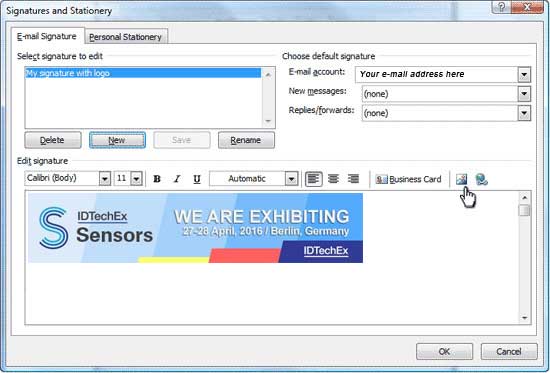
In the lower box click the picture icon. Browse system till you find your logo.
5
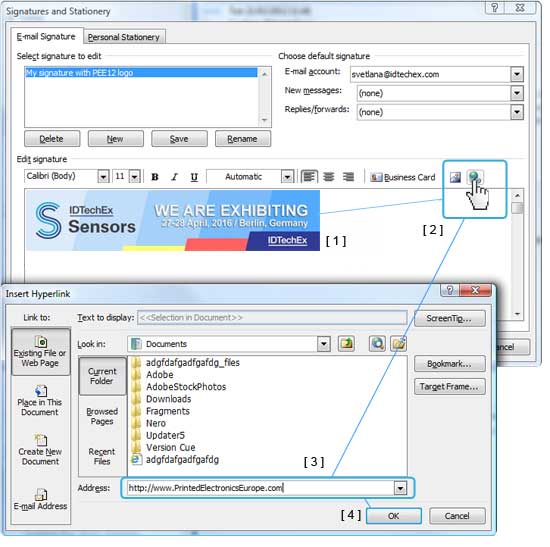
Click the banner image to select it. [1]
Click the "link" icon [2]
Type the conference web-address in the address box [3]
(! Important: Always begin with http://www)
Click Ok to apply your changes and close all dialog windows.[4]
6
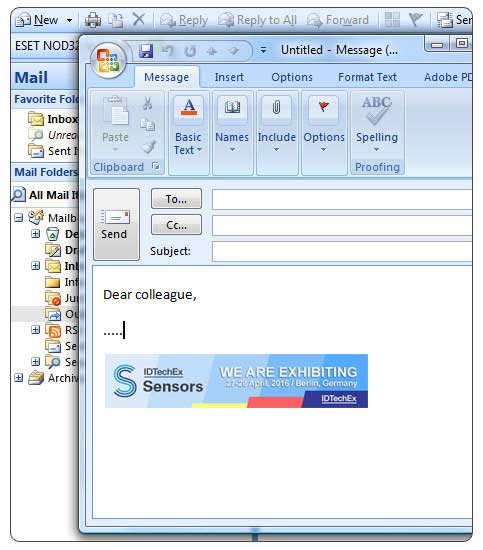
Open new email, the logo should appear in your signature area .